Starting with Total 4.5.0, a new feature called Thumbnail Post Format Icons was introduced. You can enable it in the main Theme Panel (it is disabled by default).
When active, this feature displays small icons over the featured images of your default post type (blog posts) to indicate their post format. For example, if a post is set to the video format, a small video icon will appear over its featured image.
Example result:
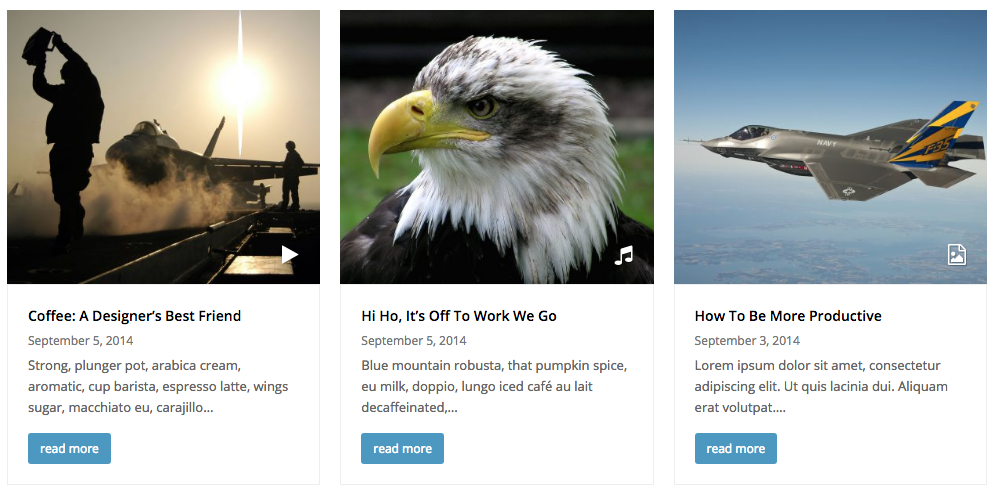
Developer Usage
As a developer you probably already know Total is always coded with you in mind! There are built-in filters you can use to add format support to 3rd party post types as well as to customize the icons. Below are 2 helpful snippets:
/**
 * Enable the thumbnail format icons for the portfolio post type.
 */
add_filter( 'totaltheme/thumbnail_format_icons/is_enabled', function( $check ): bool {
	if ( 'portfolio' === get_post_type() ) {
		$check = true;
	}
	return $check;
} );
/**
* Customize the thumbnail format icon.
*/
add_filter( 'totaltheme/post/format/icon_name', function( $icon_name ): string {
// Add the play-cicle icon for portfolio items with the tag "video"
if ( 'portfolio' === get_post_type() & has_term( 'video', 'portfolio_tag' ) ) {
$icon_name = 'play-circle';
}
// Return format icon name
return $icon_name;
} );