Version 5.4 Changelog
Version released on April 29, 2022
- It's not part of the theme update, but so you are aware, I released a plugin so you can disable WPBakery elements and slim things down.
- Custom CSS properties (css variables) have been introduced for greater flexibility and slim down Customizer settings inline CSS. Please revise your site to ensure any CSS customizations on the site aren't breaking things.
- There has been a few changes to the CSS to disable text-decoration from certain elements to allow for a new Customizer option for enabling underlines on links. If you previously had added code to your site to enable underlines on links you may want to remove that code and use the new built-in setting or at least double check it and make sure it's still working as wanted.
- You should never need to edit comments.php but if you did, make sure to compare your file with the theme's file and update it accordingly to use the new wpex_comments_class() function. If you made changes to the file you may want to reach out to ask how you can make the same changes without modifying the file to make updates easier.
- Header megamenus now use a modern CSS grid for the columns so the dividers between columns had to change from borders to pseudo elements, if you had made any modifications to the mega menu design you may want to double check it. There is now also a full tab in the Customizer under Header > Megamemus with various new options to customize the megamenu design so if you were previously using CSS for some things perhaps you don't need to anymore.
- The Mobile menu icon element "wpex-bars" has been renamed to "wpex-hamburger-icon" to prevent potential conflicts when updating as the CSS has been adjusted for a smoother animation and to allow for new Customizer settings for adjusting the width, height of each bar and space between each bar. So you no longer need to use complex CSS for altering the default design of the icon.
- The CSS used to target the Header logo now targets the "logo-img" class specifically to prevent potential conflicts when adding extra images inside your logo area via a child theme. If you were previously using code to insert a secondary logo for mobile only this code may need to be adjusted. The snippet for adding a mobile logo alternative has also been updated.
- This update introduces CSS only stretched rows for WPBakery which is a big optimization to speed up site rendering, however, it's possible it could conflict with 3rd party plugins that make use of stretched rows or alter the way WPBakery functions. If you encounter any issues the functionality can be disabled under Theme Panel > WPBakery CSS Stretch Sections & Rows.
- There has been various small CSS adjustments across the theme for better consistency, so as always, if you made any custom CSS modifications it's a good idea to quickly revise them to ensure everything still looks good.
- Added New Demo “Bryce” (already available for use).
- Added New Demo “Amelia” (already available for use).
- Added 3 New modern Header Styles have been added (Flex: Centered Menu, Flex: Left Menu, Flex: Right Menu).
- Added New Centered Logo Mobile Menu Toggle Style (Left Hamburger, Centered Logo, Right Aside) for use with the new header styles (screenshot).
- Added Custom CSS properties (css variables) have been introduced to greatly slim down CSS, make various customizer options more efficient and allow for greater/easier css customizations.
- Added “Global Styles” section added to the Customizer.
- Added Color Scheme tab added under new Global Styles Customizer tab to quickly alter the entire theme’s color scheme.
- Added The theme Button, Contact Form, Alert, Divider Dots and Newsletter elements are now available in the Gutenberg editor (more to come).
- Added The theme will now provide recommendations under Tools > Site Health (screenshot).
- Added Contact Email field in the main Theme Panel to use with the theme’s contact form element.
- Added New shortcodes “header_search_icon” and “header_cart_icon” which are mainly for use with the new header styles.
- Added Buttons for quickly inserting items into the Top Bar content area so you don’t need to refer to the docs.
- Added Quick links in the Customizer for accessing typography settings (screencast).
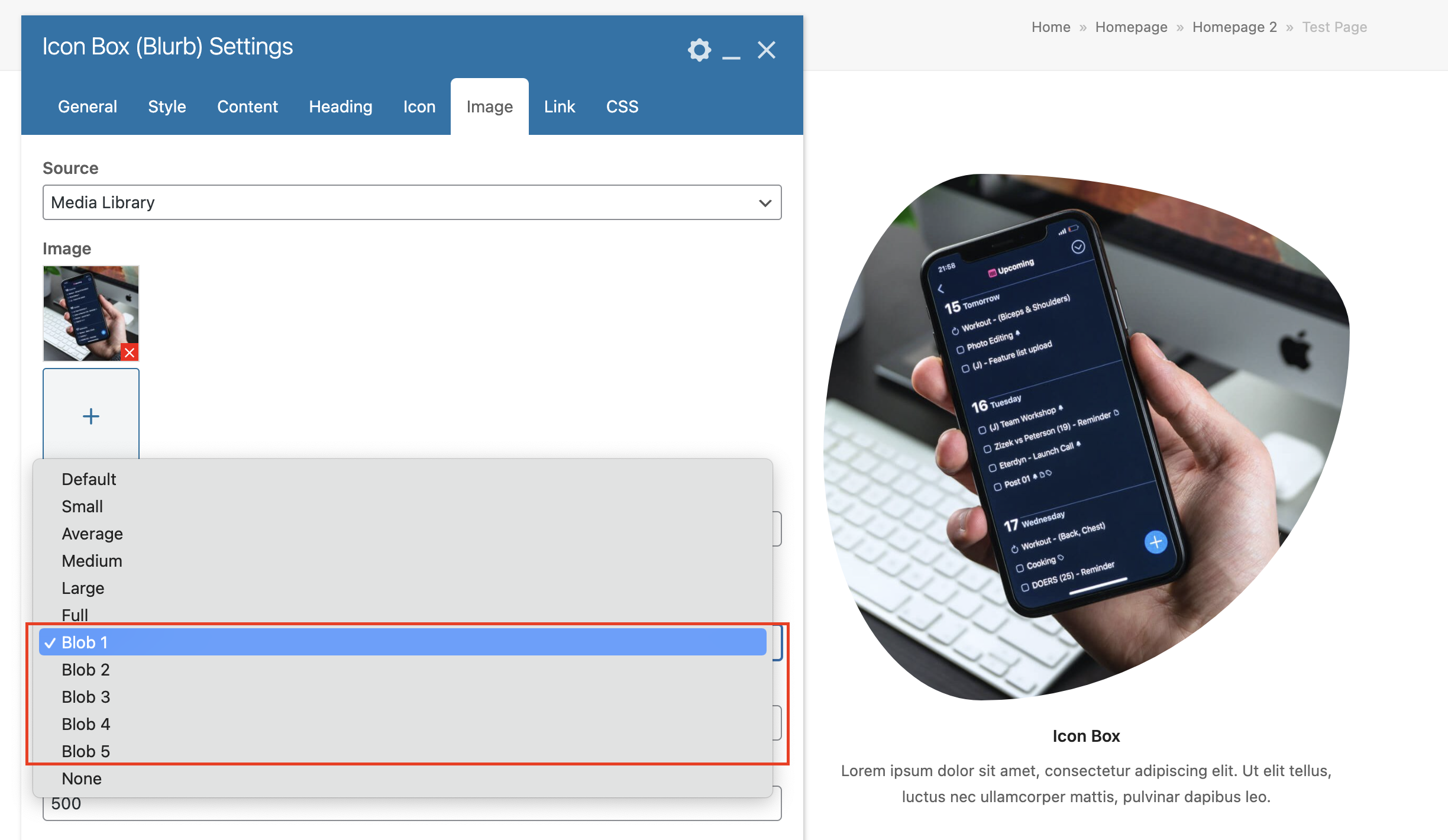
- Added “Blob” border radius options (example).
- Added “Title” Card style.
- Added Theme Panel option “Theme Settings Metabox” which allows you to disable the Theme Settings metabox displayed on posts and pages. Note: This will only disable the “core” settings but will leave the post type settings (Media, Staff, Testimonials tabs)
- Added Theme Panel option ” Card Settings Metabox” which allows you to disable the Card Settings metabox displayed on posts.
- Added Theme Panel option “WPBakery CSS Stretch Sections & Rows” (enabled by default).
- AddedTheme Panel option “Term Thumbnail Page Header” can be used to disable the functionality where the theme will grab the term thumbnail and use it as the page header background (enabled by default).
- Added Theme panel option “Term Meta Options” can be used to disable the extra settings that show up on the category/term admin edit pages to slim things down if you don’t use those.
- Added Customizer “Accent On Color” can be used to change the text color for any element that has an accent background.
- Added Customizer options have been added so you can enable the “Dark Surface” for the Sidebar Mobile menu, Footer and Footer bottom areas. If you disable the option, these areas will match the default site design color scheme.
- Added Customizer for choosing a Custom logo icon when using a text based logo.
- Added Customizer options for comment styling (screenshot).
- Added Customizer option to enable post author comment highlighting (screenshot).
- Added Customizer option added that allows you to add a “gutter” to your pagination links (screencast).
- Added Customizer options for Sensie LMS to define the layouts for the various frontend sections of the plugin.
- Added Customizer option to set a custom header menu height for use with header styles one, two, three & four.
- Added Customizer option to set a custom Sidebar mobile menu width and Gutter.
- Added Customizer option to set the Sidebar mobile menu close icon position (left/right).
- Added Customizer option under to set the Inner “Gutter” when using the boxed layout.
- Added Customizer option “Disable Outline” added for removing the outline from header styles two, three and four.
- Added Customizer option to enable “underline” for content links globally under Global Styles > Links tab with additional options specific for the Footer Widgets and Footer Bottom sections (since those sections by default will not take on the global underline).
- Added Customizer option to disable the Page Title for WooCommerce Archives (categories/tags).
- Added Customizer option to modify Footer heading colors (will target headings added inside text blocks or builder elements like icon boxes, post cards, etc).
- Added Customizer option to set the height of the Fixed Top and Navbar mobile menu toggle styles.
- Added Customizer option to set the font size for the Fixed Top and Navbar mobile menu toggle styles.
- Added Customizer option to control the color of headings inside the Toggle Bar.
- Added Customizer option to control the size of the site frame border.
- Added Customizer option to control the author bio heading font size and the gap between the avatar and the content.
- Added Customizer option to control the background and color of the cart icon bubble that displays the number of items in the cart.
- Added Customizer tab for header menu megamenus with added options.
- Added Customizer options to control the header menu dropdown link vertical and horizontal padding.
- Added Customizer option to set a custom button hover border color.
- Added Customizer option added to enable or disable the mobile menu hamburger icon animation (turns into an “x” when active).
- Added Customizer option added to modify the default mobile menu hamburger icon width.
- Added Customizer option added to enable rounded edges for the mobile menu hamburger icon.
- Added Customizer option for adding a label next to your mobile menu hamburger icon and a field to adjust the label font size.
- Added Customizer options added to adjust your active button colors (buttons become active when clicked on or when used in a filter or navigation bar menu).
- Added Customizer option added named “Use Theme Styles” under the WPBakery tab which will allow you to use the Theme style as the default style for elements such as tabs, accordions, toggles and tours. This setting is disabled by default to provide backwards compatibility.
- Added Customizer option added to add a “gutter” to the WooCommerce hover add to cart button which will add a padding around the button.
- Added Customizer option added to control the top border color for the WooCommerce cart dropdown in the header.
- Added Customizer option added to control the offset for the dropdown menu animation (default is 10px).
- Added Text Transform option added to the Page Title & Post Meta elements
- Added Gutter and Icon margin options to the Post Meta element.
- Added Ability to select a card style for the Next and Previous builder element.
- Added Estimated Read time option added to the Post Meta element.
- Added Links to developer.mozilla documentation has been added for some page builder setting descriptions (like background position and background size) to make it easier to quickly learn about how to use those fields.
- Added Object Position classes added to the CSS Framework.
- Added “Standard” option added to the page header style choices when using the Post Types Unlimited plugin. This way if you have the page header disabled by default in the Customizer you can still enable the “default” style.
- Added Breakpoint option added to the Post Cards element for use with left/right style cards to define the breakpoint at which they swap to a single column view.
- Added The theme will now automatically remove the Gutenberg “global-styles-inline-css” and svg junk in WP 5.9 when the Classic editor is enabled or Gutenberg is disabled via WPBakery to prevent useless code from being added on the frontend.
- Added Preset options have been added to the “Spacing” element which can be controlled globally.
- Added New option added to the heading element to control the “badge” font size.
- Added New option added to the Text Block element named “Apply Color To Everything?” allows you to control whether the custom text color should apply to all child elements (links, headings, etc) or just the plain text.
- Added Alternative versions of the shopping cart, bag and basket icons.
- Added BuddyPress Customizer tab with a few options for controlling the default plugin layouts.
- Added New CSS file that loads in the Slider Revolution admin to to hide advertisements and other useless junk.
- Updated Advanced functions have been introduced to turn the WPBakery stretched section/row functionality from a javascript based functionality to a CSS only functionality. This allows stretched rows to be visible as soon as the site is loaded, trim down scripts, prevent issues with dynamically added content inside stretched rows and prevent issues with stretched rows going behind the Vertical Header style. This is a big optimization and could potentially conflict with 3rd party WPBakery plugins, so please check if you are using any 3rd party plugins that alter how WPBakery works.
- Updated The Vertical Header (Header 6) CSS is now loaded only if needed inside it’s own CSS file.
- Updated Custom Term/Category settings now display inside a “Theme Settings” metabox (screenshot).
- Updated The Google Analytics ID field now accepts multiple property ID’s.
- Updated Checkboxes in the customizer now use a custom toggle design.
- Updated Various Total WPBakery element settings to allow you to select from preset options or enter custom values (screencast).
- Updated Various elements so they have a text-transform:none; CSS declaration by default to prevent issues with the new Customizer option that allows you to apply an underline to links (breadcrumbs links, heading links, entry title link, tagclould buttons, etc).
- Updated Various Dynamic Elements (page title, post media, post terms, post comments etc) to display some sort of dummy content when using in the Templatera front-end editor so it’s easier to modify post templates.
- Updated Various CSS are now more efficient and slimmer.
- Updated The mobile hamburger icon element has been renamed from “wpex-bars” to “wpex-hamburger-icon” and re-styled for a smoother animation and new Customizer settings for adjusting the width, height of each bar and the space between each bar.
- Updated Megamenus dropdown now use a modern CSS grid rather then percentage widths and floats which provides greater flexibility and slimmer code.
- Updated List style cards now use object-fit for the thumbnail to prevent any white space issues.
- Updated Color Palette and Term Colors styles now use CSS custom properties (css variables).
- Updated CSS for fixed backgrounds has been updated to prevent issues on the iPad Pro and latest versions of iOS (fixed backgrounds will be set to background-attachment scroll at max-width 1080px since there is currently no way to properly test for the device and fixed backgrounds are broken on iOS as they get zoomed in or don’t render).
- Updated Top bar Customizer social options now only show added items and allow for drag/drop sorting.
- Updated Customizer fields that require pixel values will now display the “PX” unit inside the field (screenshot).
- Updated Javascript in the Customizer when changing the site layout widths to re-trigger WPBakery stretched rows to prevent display issues when testing out different widths.
- Updated Header menu hover/active underline will now display while hovering on drop-downs and when menu items are active using the onClick dropdown method.
- Updated Search icon is now allowed in the mobile icons menu for the Fixed top mobile menu toggle style.
- Updated The mobile icons menu for the Fixed to and Navbar style mobile menu toggles now has more spacing between the icons.
- Updated Customizer Form styles will now apply to the custom select for consistency.
- Updated Gravity forms success notice has been updated to match the theme success notice.
- Updated Plus Hover Image Overlay has been updated to use an SVG instead of a background image.
- Updated Customizer table styles will now target bbPress forum tables.
- Updated BBPress warning notices now match the theme alert styles.
- Updated Tablepress plugin tables will now take on Customizer table styling options.
- Updated Sensei LMS integration has been improved with added Customizer options to control the layout of the various Sensei sections and CSS has been added to improve the general design.
- Updated Total Image element Border Radius option now allows you to select from preset sizes or enter a custom value.
- Updated The Auto Responsive “Min Font Size” field for the Heading, Text box and List Item elements has been updated so you can input your min and max font sizes so it’s easier to understand how the setting works.
- Updated Customizer Typography tab icon has been updated so it’s more legible.
- Updated The WooCommerce account new password strength indicator has an improved design.
- Updated WooCommerce login registration page now uses a CSS grid so the login and register boxes are the same heights.
- Updated WooCommerce order details billing and shipping address boxes now use a CSS grid so the items are always the same height.
- Updated Load more button now matches the other buttons on your site for consistency.
- Updated Header 2 search form & newsletter form elements will now adjust according to your font size rather than having fixed pixel dimensions.
- Updated Events Calendar default-template now use newer V2 methods.
- Updated The menu underline will now take on the link currentColor unless a custom color is specified which allows it to be more dynamic.
- Updated Customizer header menu dropdown settings now has it’s own tab to keep things better organized and make it easier to locate settings.
- Updated Theme Panel so disabled settings have an opacity so it’s easier to see what’s enabled and what’s not.
- Updated Better styling integration with BuddyPress (nouveau) so things look nicer and work with the new Color Scheme function (there is a new Customizer setting you can use to disable the theme’s custom BuddyPress CSS).
- Updated The height of WPBakery element edit box fields has increased from 30px to 34px.
- Updated The Total WPBakery Element font size field has been updated to hide the responsive font sizes unless enabled.
- Updated The “Offset Overlay Header” WPBakery row option has been optimized for the new Flex header styles so that it uses plain CSS instead of javascript.
- Updated The default header menu dropdown style “Superfish” has been updated to use CSS for the hover animations instead of jQuery animate.
- Updated The “Dropdown Animation” customizer option is now available for all dropdown methods (previously disabled for Superfish JS)
- Updated The Customizer setting used to alter the header menu link left/right padding can now be used for all header styles.
- Updated When using the Callback Function Name for an advanced query in a Total element such as the Post Cards or Post Types Grid you can now pass on the shortcode attributes to the function (sample usage).
- Updated The Customizer Logo Top/Bottom padding option was not working correctly with the vertical header so it will no longer display when using a vertical header to prevent confusion.
- Updated The Older “Center Row Content” option for WPBakery rows now supports the “Content Position” setting.
- Updated Instagram social link backgrounds will now use the instagram gradient colors instead of a solid color.
- Updated The Page Header Title border width field in the Customizer has been changed from a single field to multiple fields so you can set the top and bottom border widths independently so you don’t need custom CSS to create a design like the Bolt demo.
- Updated The comment form author and email fields now stack on screens smaller than 640px.
- Updated You can now assign an Image Hover style for your portfolio, staff and blog entries when selecting a custom card style via the Customizer.
- Fixed Header menu was not showing custom hover colors on active menu items (was only working with current items that also had dropdowns).
- Updated Vertical Header icon spacing so the search/cart icons are consistent with icons added to menu items.
- Fixed Posts Page (main blog page) was not using the correct layout when changing the default page layout.
- Fixed Blog 1 card style was not showing the comment count.
- Fixed Incompatibility issue with the Complianz plugin and theme js.
- Fixed Buttons Typography settings were not applying to the “added” to cart button when using the “Always Visible Add to Cart Button” Customizer option.
- Fixed Issue with image sorting not working in WPBakery elements (like the Image Grid) caused by the last WP update. This is a temp fix in the theme that will be removed once WPBakery core is updated.
- Fixed Custom forms label color in the Customizer was not affecting the sidebar mobile search field.
- Fixed Content alignment inside stretched rows in the Boxed theme layout when setting a custom “Inner Column Gap” was overflowing.
- Fixed Row alignment when used inside Stretched Sections in the Boxed theme layout was not correct.
- Fixed Full-screen mobile menu styles were not being applied when using the mobile menu alternative Menu Location.
- Fixed Accessibility issues with the skip-to-link button (removed role=”navigation”) and the mobile menu dropdown toggle arrows (added role=”button”).
- Fixed Headings color in the Footer widgets when used in text blocks or Gutenberg widget blocks did not match other footer headings.
- Fixed Design inconsistencies when using builder elements in the Footer via the WPBakery Template widget.
- Fixed Border color option was not applying to pagination links.
- Fixed Header Style Two and Three menus were not inheriting the body font weight.
- Fixed Default hover menu styles were not being applied when using the new CSS dropdown style.
- Fixed Megamenu Heading text color customizer option was not working with new CSS and onClick dropdown options.
- Fixed Centered Header logo was not properly centered when displaying a text based logo.
- Fixed Header menu underline when used with mega menus was overflowing.
- Fixed Customizer header menu dropdown background was not changing the caret background.
- Fixed The header menu “left-dropdowns” wasn’t working as expected in RTL mode.
- Fixed Lists did not have any spacing or bullets when added inside comments.
- Fixed Unique ID option was not working for the Categories/Terms grid element.
- Fixed WooCommerce single product rating font size was using fixed pixels instead of em.
- Fixed Contrast issues with various texts (comment date, comment reply link, shop results count, recent posts with thumbnail widget date, comments disabled text).
- Fixed Customizer sidebar link color was affecting the Post with Thumbnails date text.
- Fixed Default Gutenberg button block was not using the theme or custom button colors.
- Fixed Certain elements were not taking on the Border Accent color such as the Toggle Group, mobile toggle menu, WooCommerce account tabs, WooCommerce notices and WooCommerce address boxes, bbPress stats widget, deprecated tabs and accordions.
- Fixed WPBakery elements that allow multiple image selections could not be drag & dropped for re-ordering due to recent WP updates.
- Fixed Entering 0 into the custom excerpt field when editing a category in the backend was not removing the excerpt as expected.
- Fixed Category/Term page header was showing despite setting the global page header style in the customizer to “Hidden” if a thumbnail was defined.
- Fixed Customizer link hover color was affecting certain elements like the Toggle bar button and some card style category tags.
- Fixed Menu Background color option was showing up in the Customizer when selecting the Dev header style.
- Fixed Newsletter builder element submit button would sometimes display the text in 2 lines in Firefox & Safari when using multiple words like “Sign Up”.
- Fixed Gutenberg “Stripes” table had an extra gray background in the table header.
- Fixed WooCommerce product gallery slider arrows not showing up on the front-end by default even though it was enabled by default in the Customizer.
- Fixed The staff social links had a fixed font size in pixels so they were not changing size when modifying the body font size.
- Fixed Plus icon missing when using a custom font for the WPBakery “Toggle element”.
- Fixed The Breadcrumbs “Show only First Category” option was not working as expected.
- Fixed Certain elements were not using the Border Accent color by default (dividers, alternative pricing styles, heading, etc)
- Fixed Saving the Customizer Manager settings for the first time would remove all sections due to a core WP bug.
- Fixed When using a custom post type named “product” without WooCommerce would break the post type archives.
- Fixed Carousels FOC issues have been resolved.
- Fixed Styling issues with plugins that insert extra content to the WooCommece single product add to cart form.
- Fixed Styling issues when self hosted WP videos are loading.
- Fixed Design issues with the spinning icon in the latest version of Contact Form 7.
- Fixed The Image Banner element when set to “Featured Image” was not grabbing the taxonomy thumbnail when used in a dynamic template.
- Fixed Percentage based font-sizes in Total builder elements were being converted to pixel units.
- Fixed Sticky header ignoring the site frame border height when enabled so part of the header was being cut off.
- Fixed The “Product” WPBakery element was not being displayed in a single column grid (aka full width).
- Fixed You couldn’t click on links in the Image Slider element when adding an overlay.
- Fixed When using header style 2 and a full width header there wasn’t any space being added to the menu so the menu wouldn’t line up correctly with the logo.
- Fixed Issues with SVG images used for the Header logo not displaying.
- Fixed Potential issues with content added inside the WooCommerce products grid being rendered as a grid item (fixes issues with 3rd party plugins like the WooCommerce Load More Products plugin).
- Fixed The “Full-Width Columns On Tablets” row setting was only working on the live site and not the front-end WPBakery page builder.
- Fixed The Testimonials company text color was failing the accessibility contrast checker.
- Fixed Typography settings not affecting the WooCommerce “Leave a customer review” heading.
- Fixed The Total Image element wasn’t showing the correct translated image when using WPML Media Translation.
- Fixed The sidebar mobile menu was missing an aria-label attribute.
- Fixed Toggle bar was going behind the vertical header when using a fixed vertical header and the toggle bar was set to display “inline”.
- Fixed Video was overflowing when added as video background to a row with a border radius.
- Fixed The white in the middle of the Before/After element was off-center by 2 pixels.
- Fixed If the Newsletter element button text was saved as empty the submit button wouldn’t show, the theme now uses “Sign Up” as fallback text to ensure the button is always displayed.
- Fixed The Row Typography setting was not changing the Heading element color.
- Fixed When changing the Page Header Title text align it was working on the live site but the changes were not properly reflected in the Customizer.
- Fixed The Accent color was being applied to menu links hover and active states when a custom menu link color was defined.
- Fixed Custom CSS added to the 404 page template when displaying a custom 404 page was not being added to the page.
- Removed Extra classes being added to the search-entry-inner class which should only be added to the search-entry element have been removed.
- Removed Customizer Pointer background & border color options in the customizer have been removed as the theme will now calculate these automatically for you based on the dropdown background and border settings.
- Removed Dark styling on custom select boxes added in Footer widgets has been removed to keep consistency with all form styling.
- Removed The “images” top bar social style which was deprecated in 2019 has not been removed completely.
- Removed Old CSS used to reset the dropdown class to prevent issues with Bootstrap which is no longer required for latest versions of Boostrap but more importantly you shouldn’t be loading the entire bootstrap CSS framework on a theme that already has it’s own CSS framework.
- Removed Unused “wpex-site-overlay” element and CSS.
- Removed Legacy CSS for old WPML language switcher.