Version 5.3 Changelog
Version released on October 29, 2021
This is a big update, but most of the changes have been optimizations to the javavascript and new features. As always be sure to clear your site & browser cache after updating.
There are 2 new options in the Customizer you can change to optimize your site further. You can disable jQuery easing and you can select from the new header menu dropdown methods.
Check out the "5.3 Release Page" for a quick visual of the new features in this update.
- Added Many new section template designs.
- Added New Card Styles (simple 7,8,9 | numbered list 5,6 | portfolio 4,5,6 | testimonial 8, 9 | search 1,2,3,4,5,6 | News 1,2,3,4,5,6).
- Added New category colors functionality (screencast).
- Added New advanced Widget Areas dashboard (screencast).
- Added 3 alternative video overlay styles (screenshot).
- Added New toggle (show/hide) functionality for elements so you can create your own “tabs/toggles” (screencast).
- Added New Toggle element so you don’t have to use the WPBakery FAQ (screenshot).
- Added New toggle Group element for grouping the new toggle elements and create an accordion style toggle.
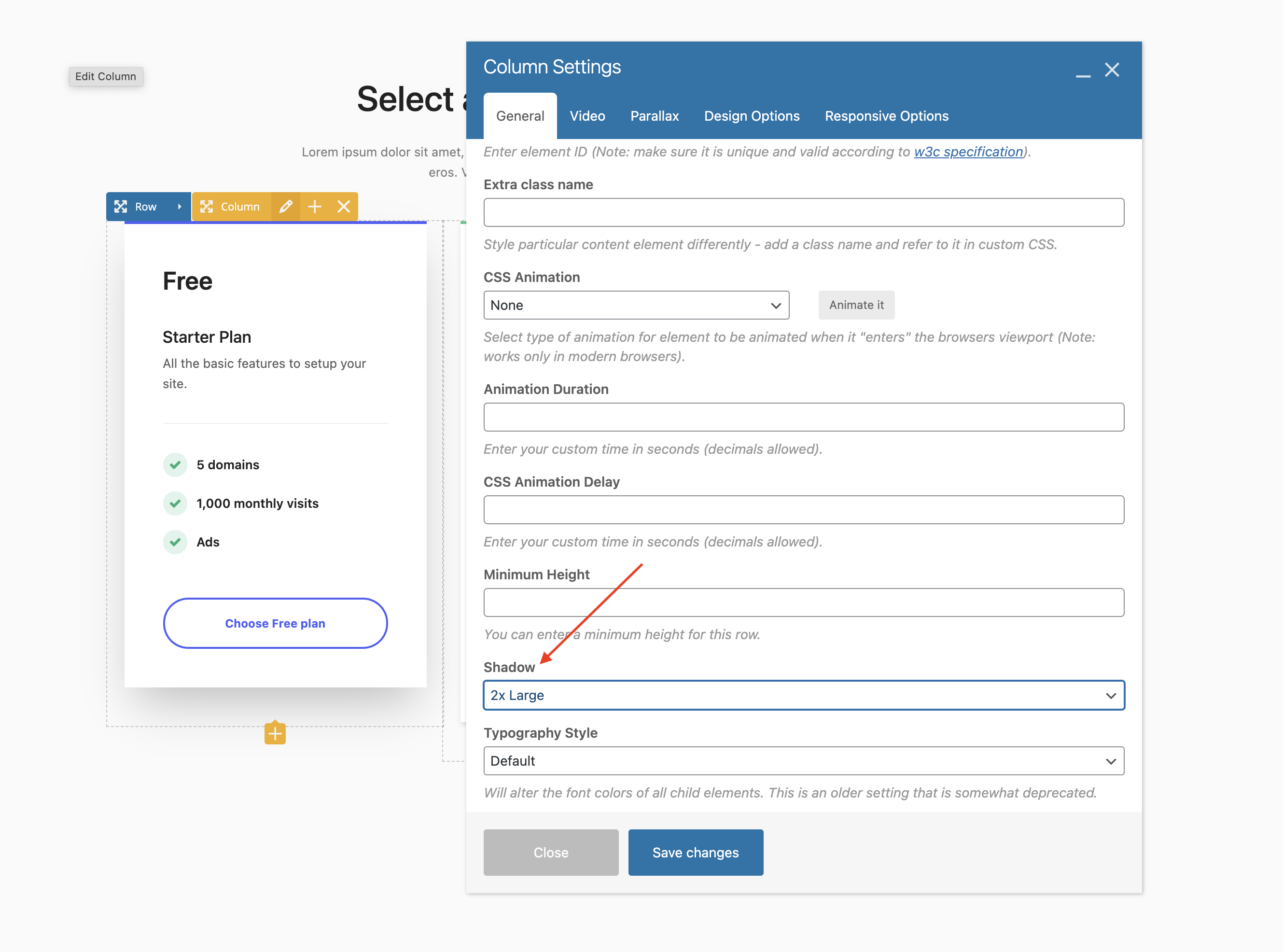
- Added New shadow option to the WPBakery columns (screenshot).
- Added Customizer option for choosing how the header menu dropdowns open – superfish, css hover or click (screenshot) – WOW – if you choose one of the new styles (css hover or on click) it will remove 2 scripts from your site speeding things up.
- Added Customizer option for the new header menu CSS and onclick hovers to “animate” the dropdowns (screencast).
- Added Customizer option for setting a padding for your header menu dropdowns.
- Added Customizer option for setting the minimum width for your header menu dropdowns.
- Added Customizer option to allow you to define your conditional logic for the Overlay/Transparent header via a query string (screenshot).
- Added Customizer option so you can enable/disable the default megamenu “stretching” which makes megamenus the same width as your header.
- Added Customizer option for entering a custom “gap” (spacing) between the WooCommerce single product gallery thumbnails.
- Added Customizer option for enabling/disabling the WooCommerce product gallery slider arrows.
- Added Customizer option for disabling the single WooCommerce product page header title.
- Added Customizer option to enable the WooCommerce product category page header background image by default (like the blog).
- Added New shadow option to the Image Banner element.
- Added “Relevance” as an orderby option for Total post based elements.
- Added Support for Advanced Parallax to the WPBakery Section element.
- Added 8 columns option for use with grid elements.
- Added home_url shortcode which may be useful to dynamically link to your homepage (such as in your footer copyright text).
- Added “Stack Gap” option to the Flex Container so you can specify a different gap when the elements stack.
- Added Bottom Icon style to the Icon Box element.
- Added Button border-width option to the Pricing Table element.
- Added Device max-width to the Column selectors in the Customizer to make it easier to understand where the breakpoints are (screenshot).
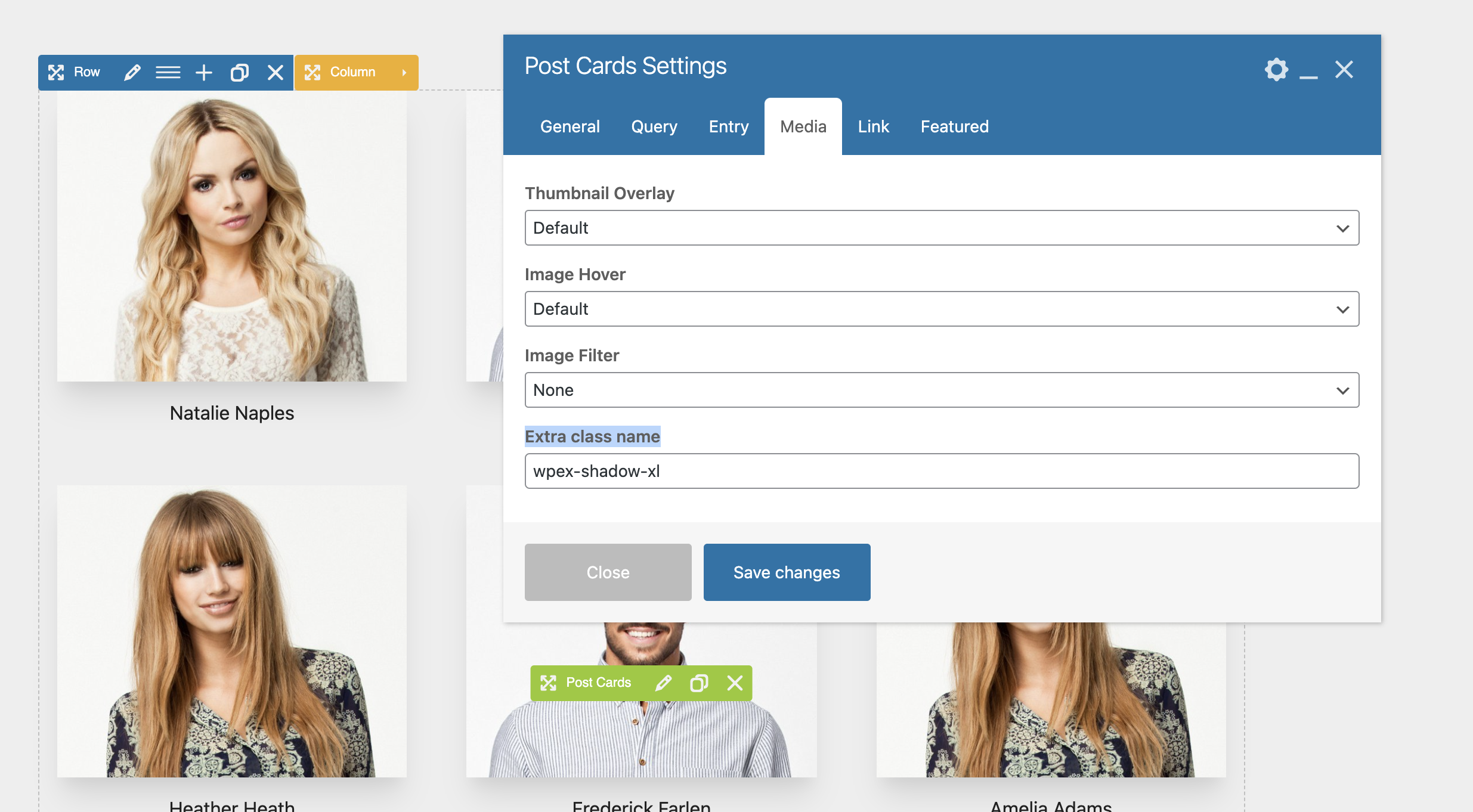
- AddedExtra class name option to the Post Cards element for the card entry, image and featured entry (screenshot).
- Added New order CSS utility classes (view classes).
- Added Custom max-width option to the WPBakery rows so you can constrain the row content (great when creating dynamic templates if you want a narrower content for the post such as this example).
- Added Max-width option to Total post elements (Post Comments, Post Meta, Post Terms, Author Bio, Post Series).
- Added “Stack at Breakpoint” option to the Icon Box (blurb) element when using the left or right styles. This is especially useful when displaying larger images instead of icons where you may want the image to stack on top at smaller screen sizes.
- Added Title Tag option to the Post Cards element so you can choose the html tag (h2, h3, h4..etc) to use for the entry titles.
- Added Responsive option to the Total spacing element if you wanted to set a different space at different breakpoints.
- Added “Go Back” option to the Theme Button element “On click action” options.
- Added Some new options to the Image Slider element (caption color, caption font weight, caption “none” style, overlay option, etc).
- Added Extra options to the Custom Login page admin panel.
- Added New max-width CSS utility classes.
- Added Parse Callback field to the Custom Field element so you can enter a callback function name that will be used to pass your custom field value through.
- Updated Optimized and converted most of the theme’s jQuery code to vanilla js. Only a few features require jQuery now (such as the sliders & carousels) all core js no longer requires any dependencies.
- UpdatedTotal Dynamic Resizing for images now supports the native WP srcset functionality.
- Updated Theme retina functionality to use srcset instead of javascript (retina.js) this means your retina images will display instantly, they will be responsive and there is one less file being loaded on the site.
- Updated Header logo will now use srcset for the retina version instead of javascript so the retina logo will display instantly now.
- Updated WooCommerce grids now use a modern CSS grid layout so we don’t have to add individual classes to each product which isn’t efficient and may cause issues with 3rd party plugins due to issues with the plugin. This will also allow for theme cards to be used with product entries.
- Updated Snippet for WooCommerce shop masonry grids support to work with the new changes to the products grid.
- Updated WooCommerce product entries to use new flex styles for keeping items the same height (by default) without the need for javascript (also prevents CLS) and renamed the “Equal Heights Entries” setting in the Customizer to “Bottom Align Buttons” which will only display if the “Always Visible Add to Cart Button?” setting is enabled.
- Updated WooCommerce product entries add to cart button to switch to “view cart” after adding an item (screencast).
- Updated WooCommerce cart overlay background to match the search overlay background.
- Updated WooCommerce single product add to cart button to respect the default and customizer button styles for consistency and easier modification (aka it no longer has its own unique styling).
- Updated Default author box to use the gap property for spacing between the avatar and text instead of margin to slim down classes and make it easier to adjust.
- Updated Demo importer so if the same demo is imported multiple times the theme will remove any duplicate menu items added by WordPress automatically.
- Updated Navigation bar so the custom side margin is removed from the last item to prevent issues when adding menus on the right side of an element.
- UpdatedWordPress gallery (when used in the classic editor or text block) to use modern CSS grid classes to slim down code.
- Updated Moved the javascript for theme post elements masonry (isotope) grids to its own js file so that it can be loaded only if needed on the page.
- Updated Added Styling for the default widget blocks added by WordPress when first installing WP.
- Updated Theme button styles to also target the Gutenberg search block and file block buttons (since WordPress, for some reason, adds custom styling to these elements instead of inheriting button element styles).
- Updated The Title Push Up overlay style to use CSS only (previously required javascript) and will now also work on the Post Cards element when links are disabled.
- Updated Smaller thumbnails on the category/term admin page that match the same size used for WooCommerce categories.
- Updated When using the nav-no-link in your menus the theme will now automatically add a tabindex value of -1 to the links for accessibility reasons.
- Updated Full-screen mobile menu will no longer add duplicate menu items if there is a parent menu item that has both a link and a dropdown, instead if you click the menu item once it will open the dropdown and if you click it a second time it will go to the link.
- Updated Demo importer so it will automatically search/replace the demo URL with your site URL so any potential links used in a demo to link to itself won’t link out to the demo after import but rather link to your own site.
- Updated Optimized header style 5 (centered logo) rendering on mobile so the logo displays immediately on page load.
- Updated Accessibility improvements for the search and cart popup overlay “x” (close) button.
- Updated The “Remove Emoji Scripts” theme panel setting will now also remove the WordPress “convert_smilies” function that is hooked into the_content.
- Updated Font size options in Total elements to support the “vh” unit.
- Updated It’s now easier to drag items in and out and around the Flex and Grid containers.
- Updated PDF attachment page to display text if the browser doesn’t support PDF’s.
- Updated Search Bar element so you can use term=current_term and author=current_author when using the search bar within dynamic archive templates.
- Fixed Issue where if you set your mobile menu breakpoint to 9999 the sticky header wouldn’t work unless you enabled sticky header on mobile. The theme will now set a mobile breakpoint for the sticky header of 960px instead so you can still control if the sticky is enabled or not on small devices when using 9999 for the mobile menu breakpoint.
- Fixed Font size issues with the icon box when using responsive font sizes (delete and re-install the Total Theme Core plugin for an instant fix)
- Fixed Stray closing link element in the Icon Box element (delete and re-install the Total Theme Core plugin for an instant fix).
- Fixed Issues when using the Boxed site layout combined with a Vertical Header and the “Fixed” vertical header style (the fixed header will now properly remain inside the boxed area and “fixed” by using the new modern “sticky” positioning).
- Fixed Issue with the load more button in Total grid elements when using custom hover styles on buttons affecting other elements on the page with custom hovers.
- Fixed Potential issues with certain Customizer settings not displaying.
- Fixed Issues with the Templatera shortcode not properly displaying on archives (fix added in the theme until the plugin developers fix the issue on their end).
- Fixed Thumbnail column showing in the WP admin for post types created with the Post Types Unlimited plugin when the post type did not support thumbnails.
- Fixed Padding & Background options not working properly in the Teaser Boxed element when selecting the Boxed Rounded style.
- Fixed Text Blocks not displaying correctly inside the Grid Element in the WPBakery front-end editor.
- Fixed Toggle bar closing when clicking on the site (not toggle button) when the “Remember State” setting is enabled and the display is set to “Overlay” making it impossible to actually keep it open.
- Fixed Potential issue with local scroll links when resizing the browser window if the sticky header gets taller or shorter.
- Fixed Mobile menu issues when using the Navbar mobile menu toggle style set to “Top of Site” Menu Position and the sticky header enabled on mobile.
- Fixed Shop cart link not showing on the Full Screen mobile menu style.
- Fixed Missing close icon on the cart overlay.
- Fixed Issue where if you changed the crop location of your thumbnails defined in the Image Sizes panel it wouldn’t work without regenerating your thumbnails.
- Fixed Issue where the entry equal height option for blog archives was being enabled for the masonry layout when it should only be allowed on the Fit Rows layout and you couldn’t disable it in the Customizer as the setting would hide once the masonry layout was selected.
- Fixed Logo top/bottom padding not working when using the centered logo header style.
- Fixed Theme element icons display in the WPBakery grid builder.
- Fixed Line-height issue with the Font Icon element when adding a custom size resulting in empty space above the icon that shouldn’t be there.
- Fixed Blog Card 3 background issue.
- Fixed Accessibility issue with the load more button so when you load new items the focus is placed on the first loaded post.
- Fixed Custom 404 page not taking on the correct default page layout.
- Fixed Display issue with the Image element when a border radius is set and an Image Overlay.
- Fixed Custom spacing with the list item element adding extra space.
- Fixed Custom logo not getting removed when using the reset button under Theme Panel > Import/Export due to recent WP changes.
- Fixed Spacing issues at the bottom of the shop/blog page when using a dynamic template for standard pages.
- Removed CSS vendor prefixes which are no longer needed to greatly slim down the CSS (you may want to check any child theme edits to remove them as well and slim down your code).
- Removed Theme no longer loads a vcex-shortcodes.js file when using the Total Theme Core plugin – all JS is now conditionally loaded if needed.
- Removed The “X-UA-Compatible” meta tag and headers for IE which are no longer needed.
- Removed Retina Logo Height options in the Customizer and theme settings metabox as they are not needed with new srcset methods for setting retina logos.