Version 5.18 Changelog
Version released on Jul 30, 2024
The twitter social share and social profile icons have been deprecated and will automatically convert to "X".
Added 17
- Added: “Image Fit” option to the Image Sizes panel for use with the “Aspect Ratio” settings.
- Added: “Infinite Loop” option to the Next/Previous Post Links element (update sponsored by MadeBySprung)
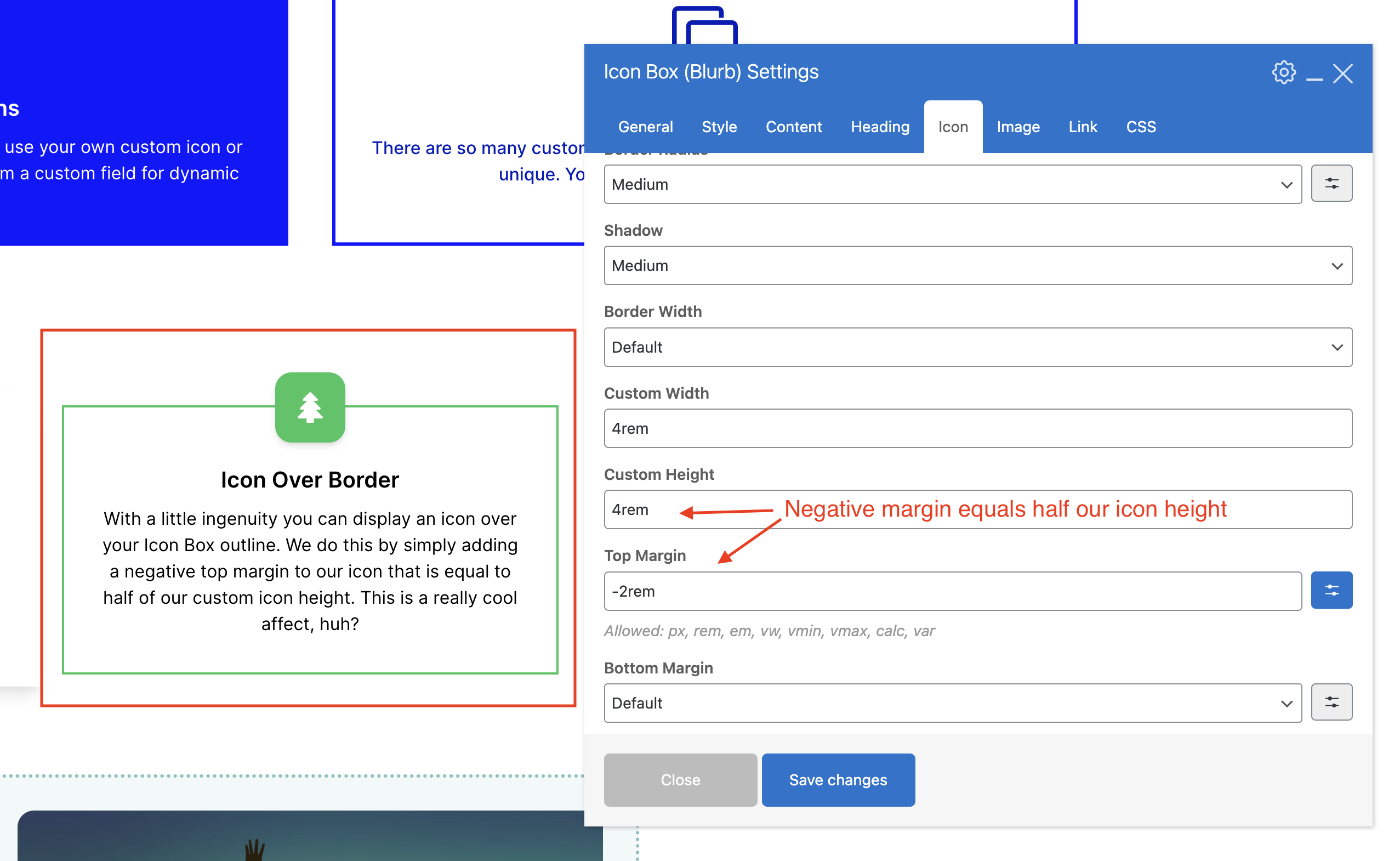
- Added: Top Margin option to the Icon Box element icon. This new setting will allow you to display icons over the icon box background or border using negative margins (example).
- Added: “Catalog: Sort By Dropdown” and “Catalog: Result Count” options to the “Woo Template Part” element.
- Added: “Image File” on click option to the Image element if you want to link to the full version of the image without lightbox.
- Added: “Source” setting to the Post Excerpt element. By default the only choice will be “Excerpt Field” but if you are using Yoast SEO you will be able to select “SEO Meta Description” for your post excerpt.
- Added: “Fallback” setting to the Post Excerpt element.
- Added: Zig-Zag option to the theme’s divider element since the zig-zag element is disabled when using WPBakery Slim Mode.
- Added: Bottom Margin option to the Woo Template Part element.
- Added: Label color option to the Countdown element.
- Added: “Inline With Content” customizer setting that can be used with the “Toggle” mobile menu style. Enabled by default. Disable to display the mobile menu over the content (like the mobile menu on this site).
- Added: “Estimated Read Time” option to the meta options in the Customizer for use with the default entry and post layouts.
- Added: New Order By settings to the Post Cards element for WooCommerce products: Sales, Average Rating & Price.
- Added: New “Post Terms” option added to the Navigation Bar Menu field so you can display current post terms.
- Added: New Theme Panel setting: “Post Media Custom Fields” so you can disable the Theme Settings media tab.
- Added: The “Enable Single Post?” option for the Portfolio & Staff post types.
- Added: New filter “totaltheme/post_gallery/include_featured_image” which can be used in your child theme to enable the post featured image to be automatically added as the first image in your post gallery.
Updated 23
- Updated: WPBakery, Templatera, Slider Revolution and Total Theme Core plugins.
- Updated: The post date meta icon has been changed from “clock-o” to “calendar-o” (here is a new snippet for customizing your meta icons).
- Updated: All twitter social links have been updated to use the “x” icon and branding.
- Updated: The Post Excerpt element has been updated to support shortcodes and dynamic variables.
- Updated: You can now use the Callout and HTML elements in the Grid Container.
- Updated: You can now use the WooCommerce Template and the Post Next/Previous elements in the Flex Container.
- Updated: The Leader element was not using the new Total theme color picker.
- Updated: The color picker so the clear button is red and is sticky in the color palette modal.
- Updated: The Post “Theme Settings” metabox will no longer display unnecessary settings when the post type being edited is not “viewable”.
- Updated: The Site Background customizer tab has been moved to the “Global Styles” panel instead of “General Theme Options”.
- Updated: The social share buttons to use aria-label attributes with more meaningful text for better accessibility.
- Updated: When setting the Post Cards display type to “Carousel” the default theme cards or any cards created via the API will now have the skip-lazy class added to prevent conflicts with WPRocket and other lazy loading plugins.
- Updated: When disabling the Staff, Portfolio or Testimonials archives or custom taxonomies the customizer tab for the post type “Archive & Entries” will not be added.
- Updated: When disabling the Single Staff, Portfolio or Testimonial Post the customzier tab for the post type “Single Post” settings will not be added.
- Updated: The “Media Display” setting in the Media tab for the Theme Settings metabox will no longer display if the post you are editing has a dynamic template assigned to it.
- Updated: If you disable the “Theme Settings Metabox”, the theme will now display the “Secondary Image” field inside the “Media” tab if it’s enabled.
- Updated: When using the Exclude Sticky Posts or Sticky Posts Only settings for elements such as the Post Cards, the theme will now only query the first 50 posts to prevent issues where perhaps a website has hundreds or more sticky posts and these queries can be very “expensive” and cause a site to crash.
- Updated: The theme will automatically add mailto: to links added in theme elements (such as the Theme Button) if it detects that the link is an email.
- Updated: The theme will automatically add tel: to links added in theme elements if it detects that the link is a phone number.
- Updated: The Post Cards Include and Exclude Terms fields are now available for more Query Types.
- Updated: When setting an element’s visibility to “Always Hidden” it will remain visible in the WPBakery frontend editor (with an opacity) so it can still be edited.
- Updated: Moved Carousel Settings for the Post Cards element to the General tab (when using WPBakery, not Elementor) to fix a WPBakery bug which causes hidden tabs to take up room in the popup window.
- Updated: The WPBakery Custom CSS & Custom JS main panels are now available for everyone to prevent issues with customers switching themes that had previously used those fields.
Fixed 12
- Fixed: Issue with Javascript based elements not rendering or working properly when first added to a page via the WPBakery front-end editor caused by their last update (carousel, milestone, slider, masonry grids, etc).
- Fixed: Issues where changes made to the homepage in the “Theme Settings” metabox would affect the multisite sign up, register and login pages since WordPress returns the homepage ID for these pages when using a static page as the frontpage.
- Fixed: Not being able to add multiple custom font files in the Font Manager (delete and re-install Total Theme Core for instant fix).
- Fixed: The Post Meta element was adding an empty link around the author when author archives are disabled.
- Fixed: Icons used in theme cards not working when SVG icons are enabled.
- Fixed: Deprecated: Function Vc_Base::addPageCustomCss is deprecated since version 7.7! notices – which also fixes issues with dynamic template page CSS not being added to the site.
- Fixed: When disabling the Theme Settings metabox in the Post Types Unlimited Plugin but enabling the Metabox Media Tab would cause all the settings to display not just the Media settings.
- Fixed: Consistency with certain card styles that had icons using 5px instead of 10px for the space between the icon and the text next to it.
- Fixed: The Post Cards entry media max width setting was not working for the testimonials 2 and 3 styles.
- Fixed: The “Search 6” card style was using a custom gray border color and not the main border color.
- Fixed: Issues with the Cart Link element not working in WPBakery.
- Fixed: Empty space at the start of the comments.php file.
New Hooks
totaltheme/post_gallery/include_featured_imagetotalthemecore/vcex/post_query/max_sticky_poststotalthemecore/meta/main_metabox/has_media_fieldstotalthemecore/meta/main_metabox/has_core_fieldstotalthemecore/meta/main_metabox/post_typesvcex_toggle_open_icon_svgvcex_toggle_close_icon_svg