The Page Header Title in the Total WordPress Theme is the large, customizable header that appears at the top of your pages, posts, and archives. It displays your page title, optional subheadings and breadcrumbs, helping visitors quickly understand where they are on your site.
You can customize it directly in the WordPress Customizer to match your site’s branding – from layout and alignment to colors, background images, and typography. Or, you can disable it completely if you rather add the current page title directly in your dynamic templates.
Where It Appears
The Page Header Title is visible on:
- Pages and posts
- Archive pages (categories, tags, search results, etc.)
- WooCommerce pages like shop and product pages (optional)
It provides a consistent, branded look across your site.
Customizing the Page Header Title
Total Theme includes a wide range of settings to personalize the Page Header Title in the Customizer at Appearance > Customize > Page Header.
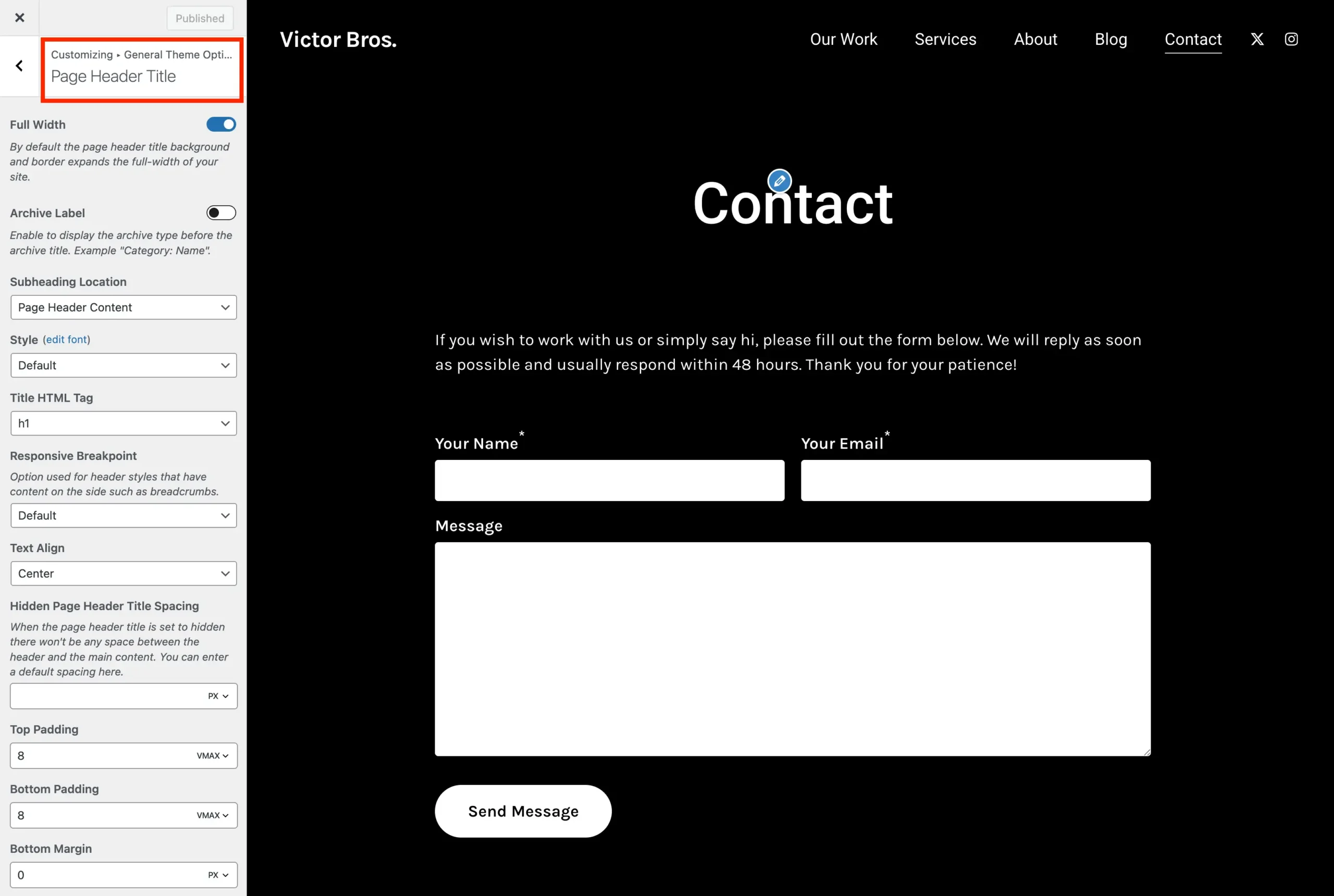
From here you can modify various settings including:
- Full Width: Extend the header background and borders across the full width of your site.
- Style: Select from multiple header styles.
- Title HTML Tag: Choose between
h1orspanfor the title element. - Min Height & Padding: Adjust vertical spacing for the header.
- Text Align: Left, center, or right.
- Vertical Alignment: Top, center, or bottom.
- Subheading Location: Decide where subheadings appear.
- Archive Label: Show the archive type (e.g., “Category: Name”) before the title.
- Background: Customize the default background color, image and gradient.
- Use Featured or Secondary Thumbnail as Background: Enable this option when selecting the “Background Image” title style to automatically show the featured image as the page header title background.
- Borders: Modify the default top and bottom border color and width.
- Padding: Modify the default top and bottom padding.
- Hidden Header Spacing: Set spacing when the header is hidden.
- Title Color: Customize the text color for titles.
- Breadcrumbs: Show or hide breadcrumbs under the title.
- Typography: To customize the font size, line height, font family..etc – you can do so under Customize > Typography > Page Header Title.
All these options can be previewed live in the Customizer, making it easy to see changes in real time.